
Zebra MC67NA-PEABAA00300 Mobile Barcode Computer
SKU: MC67NA-PEABAA00300
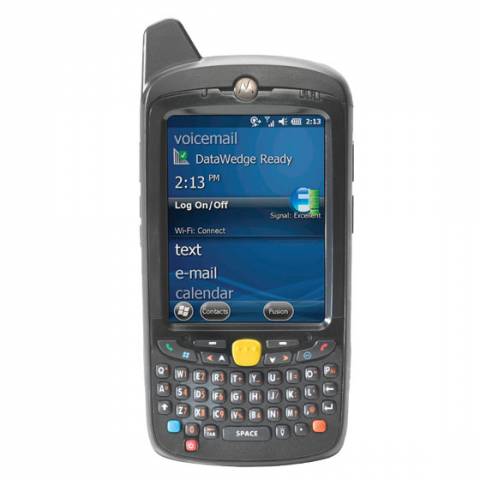
Zebra MC67NA-PEABAA00300 Mobile Barcode Computer
Product Description
The rugged Motorola MC67 combines the functionality of a cell phone, a barcode scanner, a camera, a walkie-talkie and a mobile computer all into one small and handy device.We recommend using the MC67 for task worker applications in the field such as Healthcare, Event Tracking, and Sales Order Entry.
Complete MC67 Barcode Kits Available Here with TracerPlus Software >>
Talk about ruggedness, the Motorola MC67 is far tougher that any commercial market or consumer PDA offering an 8-foot drops spec, and is sealed to IP65 and IP67 standards.With its wireless WAN capabilities, users can send data over 4G HSPA+, while also supporting autonomous and assisted GPS.
The Motorola MC67 is well equipped for data capture with its powerful Symbol SE4500 1D / 2D DL Imager that can handle any 1D and 2D barcode or decoding task.
Find Mobile Solutions for your MC67 on TracerPlus.com >>
What's Included:
- Motorola MC67 Barcode Terminal with Windows Embedded Handheld 6.5, 512MB RAM / 2GB Flash Memory and Qwerty Keypad
- Lithium Ion Battery
Note: Additional products and software may be required.
Zebra MC67NA-PEABAA00300 Barcode Terminal Features
- 3.5 in. color VGA display, touch, 640 x 480 portrait, 650+ NITs
- 4G HSPA+ WAN
- Tri-mode IEEE 802.11a/b/g/n Radio and Bluetooth v2.1 EDR
- Integrated standalone and Assisted-GPS (A-GPS): SUPL 1.0
- Microsoft Windows Embedded Handheld 6.5 Professional
- 2D DL (Driver's License) Imager Engine (SE4500)
- 512MB RAM / 2GB Flash
- Qwerty keypad
- User accessible microSD slot (supports up to 32GB)
- Multiple 6 ft. drops per MIL-STD 810G specifications and IP64 sealing
- 1.5x Rechargeable Lithium Ion 3.7V, 3600 mAh battery
FAQ and Support Resources for the Zebra MC67NA-PEABAA00300
Do I need software for my Motorola MC67 to scan barcodes and save data?
Yes, the Motorola MC67 does not come with software. Our TracerPlus Mobile Software is a great solution for the Motorola MC67 and allows you to create custom barcode enabled forms with no programming. Bundled Kits are also available with Hardware and software.
 Warm and Cold Boot instructions for the Motorola MC67 - KB Article
 Motorola MC67 User Guide - Windows Embedded Handheld 6.5
Motorola MC67 Integrator Guide - Windows Embedded Handheld 6.5
Motorola MC67 Quick Start Guide - Windows Embedded Handheld 6.5