
Honeywell 6100LP11111E0H Mobile Barcode Computer
SKU: 6100LP11111E0H
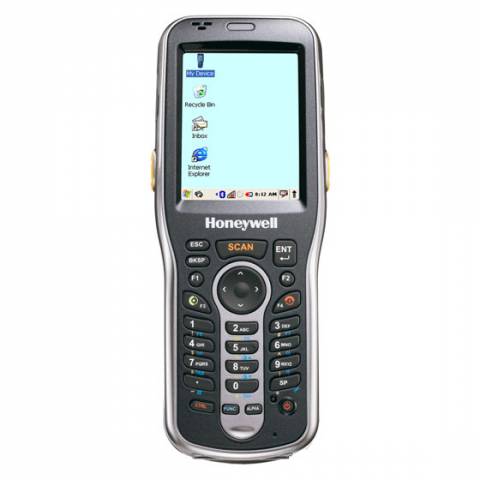
Honeywell 6100LP11111E0H Mobile Barcode Computer
Product Description
Honeywell's Dolphin 6100 Mobile Barcode Terminal provides advanced data collection and 802.11 wireless communications to a variety of mobile tasks including fixed asset management, inventory control and price check/markdowns. Designed with ergonomics in mind, this mid-sized barcode terminal features an angled imager that allows users to view the screen while scanning barcodes. Despite its stylish exterior, the Dolphin 6100 was built for rugged conditions and is IP54-rated to endure exposure to dust, dirt and splashing water, as well as accidental drops to concrete from distances as high as 4 feet. Compatible with TracerPlus Mobile Software.
What's Included:
- Dolphin 6100 Barcode Terminal
- Lithium Ion Battery
- Power Supply for Charging
- Hand-strap with Stylus
Note: Additional products and software may be required.
Honeywell 6100LP11111E0H
- Sleek, User-Friendly Design
- 2.8" transmissive active matrix 65k color LCD with backlight, QVGA (240 x 320)
- Dual Mode 802.11 b/g radio(11 Mbps/54 Mbps) with internal antenna
- Bluetooth v2.0 Enhanced Data Rate (EDR) with on-board antenna
- 5300SR 2D Imager with Adaptus Technology and Laser Aimer
- User accessible Micro SD Card up to 4 GB with SDIO support
- 128MB RAM / 128MB Flash
- 28-key shifted alpha numeric keypad with backlit keys
- Microsoft Windows CE 5.0
- Withstands multiple 4 ft. drops to concrete and IP54 sealing
- Standard battery: Li-Ion, 3.7 V, 2200 m/Ah
- AC Power adapter for charging included
FAQ and Support Resources for Honeywell 6100LP11111E0H
Do I need software for my Dolphin 6100 to scan barcodes and save data?
Yes, the Dolphin 6100 does not come with barcode software. Our TracerPlus Software is a good fit for the Dolphin 6100 and allows you to create custom barcode enabled forms with no programming. Bundled Kits are also available with Hardware and software.
 Warm and Cold Boot instructions for the Dolphin 6100 - KB Article
How to adjust the Honeywell Dolphin 6100 imager to read stacked barcodes - KB Article
How to decode 2D Data Matrix barcodes with the Honeywell Dolphin 6100 - KB Article
 Configuring the Dolphin 6100 to connect to Wi-Fi
Dolphin 6100 User Manual - Windows CE 5.0