
Zebra MC55A0-P40SWQQA9WR Mobile Barcode Computer
SKU: MC55A0-P40SWQQA9WR
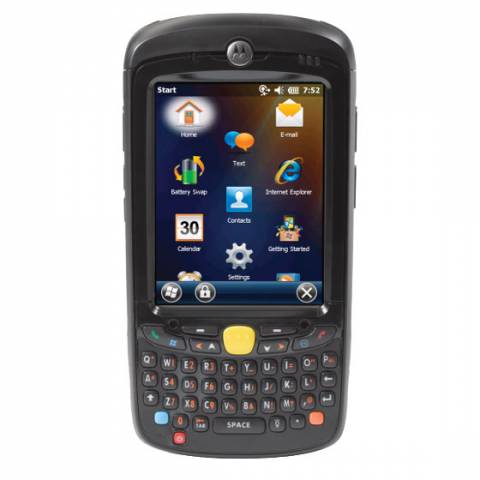
Zebra MC55A0-P40SWQQA9WR Mobile Barcode Computer
Product Description
The Motorola MC55A Barcode Terminal has the power to handle virtually any task giving your workers best in class mobile application performance, even for the most demanding multimedia applications. Packed with the latest in technology, the powerful MC55A platform offers the most current mobile operating system for the enterprise, as well as the fastest processor and largest memory footprint in this device class.The revolutionary SE4500-SR 2D imager delivers true laser-like performance and omni-directional scanning of both 1D and 2D bar codes offering the best range on medium and low density bar codes. Compatible with TracerPlus Mobile Software.
Complete MC55A Barcode Kits Available Here with TracerPlus Software >>
Use the Motorola MC55A barcode terminal for mobile solutions including Field Service, Asset Management, and Inspections.
What's Included:
- Motorola MC55A Barcode Terminal with 1D / 2D Imager Scanner, 3.2 mega-pixel Camera, Windows Mobile 6.5, 256MB RAM / 1GB Flash Memory and Qwerty Keypad
- Lithium Ion Battery
Note: Additional products and software may be required.
Zebra MC55A0-P40SWQQA9WR Barcode Terminal Features
- PenTile 3.5 in Color VGA,super bright 650+ NITS Display
- 802.11a/b/g tri-mode radio and Bluetooth v2.1 with EDR
- 2D SE4500-SR Barcode Imager
- High-resolution 3.2 MP autofocus color camera
- 256MB SDRAM/1GB Flash Memory
- User accessible microSD card slot
- QWERTY KeyPad
- Windows Mobile 6.5 Classic Operating System
- Multiple 6 ft./1.8 m drops per MIL-STD 810G specifications
- 1.5x Rechargeable Lithium Ion 3.7V, 3600 mAh Smart Battery
- Backwards compatibility with all MC55 accessories

FAQ and Support Resources for the Zebra MC55A0-P40SWQQA9WR
Do I need software for my Motorola MC55A to scan barcodes and save data?
Yes, the Motorola MC55A does not come with software. Our TracerPlus Mobile Software is a great solution for the Motorola MC55A and allows you to create custom barcode enabled forms with no programming. Bundled Kits are also available with Hardware and software.
 Warm and Cold Boot instructions for the Motorola MC55A - KB Article