
Zebra MC75A0-PY0SWQQA9WR Mobile Barcode Computer
SKU: MC75A0-PY0SWQQA9WR
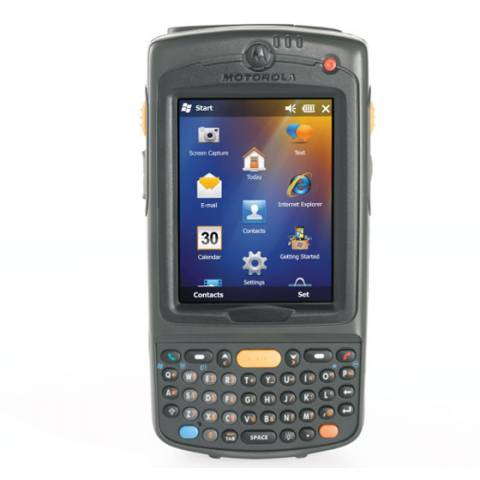
Zebra MC75A0-PY0SWQQA9WR Mobile Barcode Computer
Product Description
The Motorola MC75A0-PY0SWQQA9WR Barcode Terminal, one of the world's premium EDAs, offers more features and functionality, in a field-proven rugged form factor, than any other device in its class. With a feature set that includes many Motorola-unique capabilities, the MC75A0 offers a level of flexibility that puts it in a class of its own addressing the top mobility needs of businesses inside the four walls and out in the field.
Note: The MC75A0 has been replaced by the MC67 - Browse MC67 Barcode Terminals. The MC67 offers an upgraded processor and memory for faster performance and offers Windows Embedded Handheld and Android OS's.
Zebra MC75A0-PY0SWQQA9WR Barcode Terminal Features
- 3.5 inch color high definition VGA display (640 x 480) with the latest in LCD technology
- Tri-mode 802.11 a/b/g Radio and Bluetooth v2.1 with Enhanced Data Rate (EDR)
- Microsoft Windows Mobile 6.5 Classic
- 1D Laser Scanner (SE950)
- 3.2 Mega-pixel auto-focus digital camera
- 256MB RAM / 1GB Flash
- Qwerty keypad
- User accessible microSD card slot
- Multiple 5 ft. drops to concrete and IP54 sealing
- 1.5x Rechargeable Lithium Ion 3.7V, 3600 mAh Smart Battery
- Backwards compatible with most MC70 and MC75 Accessories
FAQ and Support Resources for the Zebra MC75A0-PY0SWQQA9WR
Do I need software for my Motorola MC75A to scan barcodes and save data?
Yes, the Motorola MC75A does not come with software. Our TracerPlus Mobile Software is a great solution for the Motorola MC75A and allows you to create custom barcode enabled forms with no programming. Bundled Kits are also available with Hardware and software.
 Warm and Cold Boot instructions for the Motorola MC75A - KB Article
 Motorola MC75A Integrator Guide
Motorola MC75A Quick Start Guide
Motorola Battery Management User Guide
Wireless Fusion Enterprise Mobility Suite User Guide