
Motorola MC40 Android Wireless Barcode Kit - Includes BarCode Software
SKU: MOT-MC40-CBTP
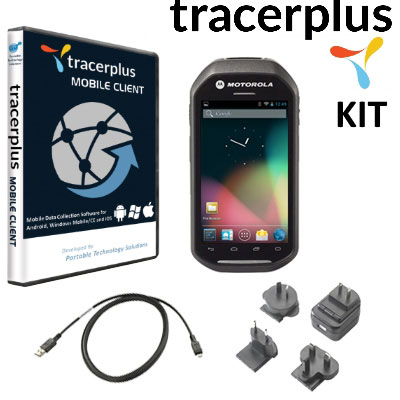
Motorola MC40 Android Wireless Barcode Kit - Includes BarCode Software
Product Description
The Motorola MC40 Android Wireless Barcode Kit, featuring TracerPlus Mobile Software, enables customers of any type to start collecting data via barcode at an affordable price. The Motorola MC40 is a durable barcode terminal with an efficient scan engine and has a sleek ergonomic design that is small enough to fit in your pocket or on a belt without hindering other tasks. The Motorola MC40 is powered by Android 4.1.1 Operating System and eliminates many features not needed for simple applications that don't require immediate data transfer or sharing.

The Motorola MC40 TracerPlus Barcode Kit Includes:
- MC40 Wireless Barcode Terminal with 1D/2D Imager and Android 4.1.1 OS
- Choice of TracerPlus Standard or Professional (Recommended)
- TracerPlus Desktop Mobile Project Design Tool
- USB Micro Cable w/ Power Supply and Line Cord for charging
- Software Support Agreement Optional
- Hardware Maintenance Agreement Optional
The MC40 has been discontinued and replaced by the TC51. View all TC51 Android Barcode Scanners.
Motorola MC40 Hardware Specs
- Android 4.1.1 Jellybean OS
- SE4500-DL 1D / 2D barcode imager
- Tri-mode IEEE 802.11a/b/g/n WLAN
- PTT (client included)
- 4.3 in. touch-only display with LED backlight; 480 x 800; 300 NIT
- 800MHz OMAP 4 dual-core processor and 1G Ram / 8GB Flash memory
- Rear-facing 8 MP auto-focus with aiming for barcode scanning and image capture
- Rechargeable Lithium Ion 3.7V, 2680 mAh Smart battery
- Multiple 4' / 1.2m drops per MIL-STD 810G; multiple 3' / 0.9m drops to tile
TracerPlus Mobile Software Specs
- No programming required
- Create up to 32 different applications and up to 100 fields of data per app
- Design enterprise class forms from your PC using TracerPlus Desktop
- Data capture features include Barcodes, Signatures, Drop Downs, Radio Buttons, Check Boxes, Date Pop-ups, Number Pad Pop-ups and Text fields
- Import/Export data to text/csv files by default or sync data in batch, wireless or real-time to Excel or any ODBC database using TracerPlus Connect
FAQ and Support Resources for the Zebra MOT-MC40-CBTP
 Warm and Cold Boot instructions for the Motorola MC40 - KB Article
 Motorola MC40 Integrator Guide
Motorola MC40 Quick Start Guide