
CipherLab RS30 Android TracerPlus Pro Barcode Kit
SKU: CPH-RS30-KIT
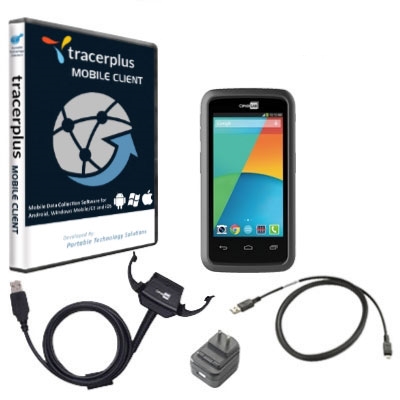
CipherLab RS30 Android TracerPlus Pro Barcode Kit
Product Description
The CipherLab RS30 Android TracerPlus Pro Kit features a touch centric Enterprise Smartphone with an Industrial design made to satisfy all the needs of your mobile workers for customer-facing mobile applications. The RS30 coupled with our TracerPlus Pro mobile software enables you to scan barcodes, take pictures, capture GPS and much more, all while syncing the collected data wirelessly or in real-time to the backend database of your choice with TracerPlus Connect.
Find Mobile Apps for your RS30 on TracerPlus.com >>
The RS30 Rugged Barcode Kit can be used for an abundance of mobile applications including those for Route Accounting, Field Service, and Healthcare.
The CipherLab RS30 Rugged Barcode Kit Includes:
- CipherLab RS30 Touch Computer with Android OS
- Choice of GMS or Non_GMS - Google Mobile Services (GMS) available on models marked as GMS and will included things such as the Play Store.
- Choice of barcode scanner and device color
- TracerPlus Professional License
- TracerPlus Desktop Mobile Project Design Tool
- Charging Cable, Power Supply and USB Micro Cable
- Hardware and Software Support Optional
CipherLab RS30 Hardware Specs
- Android 4.4.2
- 1D Laser or 1D/2D Barcode Imager
- IEEE802.11 b/g/n and Bluetooth® v4.0 (class 2)
- GSM / GPRS / EDGE / WCDMA / HSDPA / HSUPA / HSPA+ WWAN
- GPS, integrated with A-GPS ready
- 4.7" qHD 540(W) x 960(H), exceptionally bright image with 510 NITS, transmissive IPS LCD, Corning Gorilla Glass 3
- Cortex 1.3 GHz Quad Core Processor and 1G Ram / 8GB Flash memory
- Autofocus 8 megapixels with user-controllable flash
- SGS certified 1.2 m (4 ft.) multiple drops onto concrete

TracerPlus Mobile Software Specs
- No programming required
- Create up to 32 different applications and up to 100 fields of data per app
- Design enterprise class forms from your PC using TracerPlus Desktop
- Data capture features include Barcodes, Signatures, Images, GPS, Drop Downs, Radio Buttons, Check Boxes, Date Pop-ups, Number Pad Pop-ups and Text fields
- Import/Export data to text/csv files by default or sync data in batch or wireless to Excel or any ODBC database using TracerPlus Connect
FAQ and Support Resources for CipherLab CPH-RS30-KIT
Do I need software for my CipherLab RS30 to scan barcodes and save data?
Yes, the CipherLab RS30 does not come with software.
Our TracerPlus Mobile Software included in this kit is a great solution for the CipherLab RS30 and allows you to create custom barcode enabled forms with no programming.
 Warm and Cold Boot instructions for the CipherLab RS30 - KB Article