
Honeywell Dolphin 6100 Wireless Barcode Kit with CE 5.0 and TracerPlus
SKU: HHP-6100-WK-TP
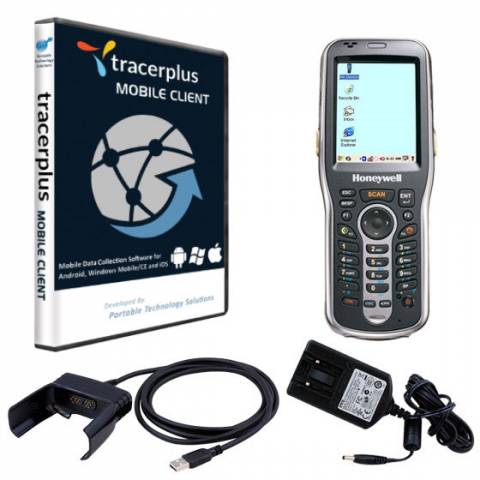
Honeywell Dolphin 6100 Wireless Barcode Kit with CE 5.0 and TracerPlus
Product Description
Honeywell Dolphin 6100 Wireless Barcode Kit with Windows CE and TracerPlus Software
The Dolphin 6100 Wireless Barcode Kit is a stylish, sleek and rugged solution to your mobile data collection needs while also being easy on your budget. Featuring TracerPlus Standard or Professional wireless data collection software along with the versatile 6100, this kit is ideal for a variety of mobile applications including fixed asset tracking, inventory control and price markdowns. Purpose built for in-premise applications, the Dolphin 6100 provides mobile workers with the tools needed to streamline tasks, improve productivity, and maximize investment protection.
The Honeywell 6100 TracerPlus Barcode Kit Includes:
- Dolphin 6100 Wireless Barcode Terminal with Windows CE 5.0
- TracerPlus Standard or Professional License
- TracerPlus Desktop Mobile Project Design Tool
- USB Sync Cable
- AC Adapter for Charging
- Software Support Agreement Optional
- Hardware Maintenance Agreement Optional
Dolphin 6100 Hardware Specs
- 2.8" transmissive active matrix 65k color LCD with backlight, QVGA (240 x 320)
- Dual Mode 802.11 b/g (11 Mbps/54 Mbps) with internal antenna
- Bluetooth v2.0 Enhanced Data Rate (EDR) with on-board antenna
- IS4813 1D Laser Scanner scanner
- 128MB RAM / 128MB Flash
- 28-key shifted alpha numeric keypad with backlit keys
- Microsoft Windows CE 5.0
- Withstands multiple 4 ft. drops to concrete and IP54 sealing
- Extended Battery: Li-Ion 3.7 V, 3300 mAh
TracerPlus Mobile Software Specs
- No programming required
- Create up to 32 different applications and up to 100 fields of data per app
- Design enterprise class forms from your PC using TracerPlus Desktop
- Data capture features include Barcodes, Signatures, Drop Downs, Radio Buttons, Check Boxes, Date Pop-ups, Number Pad Pop-ups and Text fields
- Import/Export data to text/csv files by default or sync data in batch, wireless or real-time to Excel or any ODBC database using TracerPlus Connect
FAQ and Support Resources for the Honeywell HHP-6100-WK-TP
 Warm and Cold Boot instructions for the Dolphin 6100 - KB Article
How to adjust the Honeywell Dolphin 6100 imager to read stacked barcodes - KB Article
How to decode 2D Data Matrix barcodes with the Honeywell Dolphin 6100 - KB Article
 Dolphin 6100 User Manual - Windows CE 5.0
Dolphin 6100 Quick Start Guide