
Zebra MC3190-GL3H24E0A Mobile Barcode Computer
SKU: MC3190-GL3H24E0A
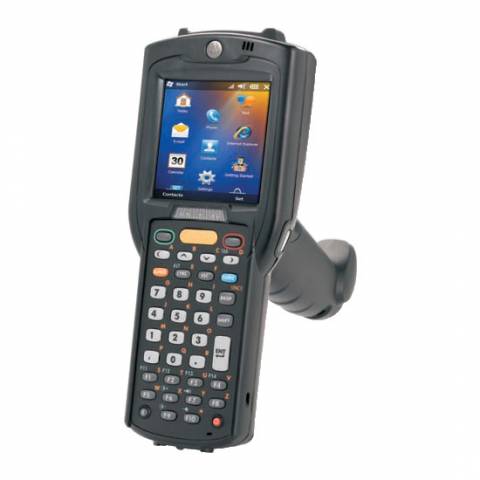
Zebra MC3190-GL3H24E0A Mobile Barcode Computer
Product Description
Built on the successful MC3090-G platform, the Motorola MC3190G Barcode Terminal is a rugged, wireless device bringing cost effective anytime mobility to key based applications within the 4 walls. With Motorola MAX Rugged, the MC3190G is designed to easily handle the inevitable everyday drops and bumps and passes Motorola's stringent mechanical design tests for both stress and endurance. The integrated 802.11 a/b/g tri mode radio enables cost-effective voice and data communication in the office and in hot spots while offering easy integration with virtually any WLAN.
No matter what type of data you need to capture, you can count on the superior performance of the SE950 1D laser scanner coupled with the ergonomic and comfortable pistol grip. Compatible with TracerPlus Mobile Software.
Note: The MC3100/MC3190 has been replaced by the MC32N0 - Browse MC32N0 Barcode Terminals. The MC32N0 offers an upgraded processor and memory for faster performance and offers Windows Embedded Compact and Android OS's.
Zebra MC3190-GL3H24E0A
- 3.0 in. Color (TFT) Display (320 x 320) with backlight
- Tri-mode 802.11 a/b/g Radio and Bluetooth v2.1 with Enhanced Data Rate (EDR)
- Backwards compatible with most MC3000 Accessories
- 1D Laser Scanner (SE950)
- 256MB RAM / 1GB ROM
- 38-Key alpha-shifted keypad
- User accessible SD/MMC slot; approved for memory expansion only
- Microsoft Windows Mobile 6.5 Classic
- Multiple 4 ft. drops to concrete across the operating temperature range and IP54 Category II sealing
- Rechargeable Lithium Ion 4800 mAh High-Capcity battery @ 3.7V
FAQ and Support Resources for Zebra MC3190-GL3H24E0A
Do I need software for my Motorola MC3190G to scan barcodes and save data?
Yes, the Motorola MC3190G does not come with software. Our TracerPlus Mobile Software is a great solution for the Motorola MC3190G and allows you to create custom barcode enabled forms with no programming. Bundled Kits are also available with Hardware and software.
 Warm and Cold Boot instructions for the Motorola MC3190G - KB Article
 Motorola MC3190G Integrator Guide
Motorola MC3190G Quick Start Guide
Motorola Battery Management User Guide
Wireless Fusion Enterprise Mobility Suite User Guide