
Zebra MC3200 Wireless Barcode Kit, Windows CE 7.0 and TracerPlus Pro
SKU: SYM-MC3200-CE-CRTP
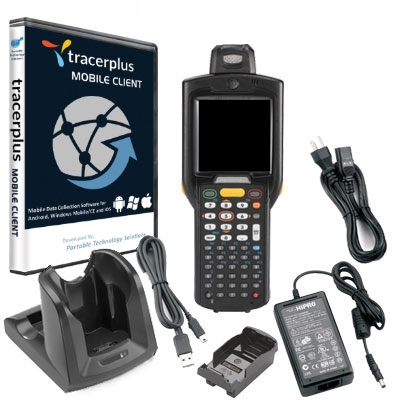
Zebra MC3200 Wireless Barcode Kit, Windows CE 7.0 and TracerPlus Pro
Product Description
Get up and running with the Zebra MC3200 CE Barcode Kit with TracerPlus Pro. This kit includes the latest CE barcode terminal from the best in class MC3000 series, the MC3200, and enterprise mobile software that lets you easily set up your own mobile data applications.
Find Mobile Applications for your Zebra MC3200 >>
TracerPlus Pro Mobile Barcode Software enables business of any size to collect data including barcode scans, signature capture, text entry, drop downs and more while enabling that data to be synced in batch, wirelessly or in real-time to the database of your choice.
PTS recommends using the MC3200 CE Barcode Kit for a wide range of mobile applications including Inventory Audits, Asset Tracking and Tool Room Tracking.
The Zebra MC3200 CE Barcode Kit Includes:
- MC3200 Barcode Terminal with Windows Embedded Compact 7.0
- Choice of Memory, Keypad and scan engine
- TracerPlus Professional Mobile Barcode Software
- TracerPlus Desktop Mobile Project Design Tool
- Single slot charging cradle w/ Power Supply and Line Cord
- Adapter battery cup for spare battery charging
- USB cable for syncing with PC
- Hardware and Software Support Optional
Zebra MC3200 Hardware Specs
- 3.0 inch color TFT (320 x 320) display
- IEEE 802.11a/b/g/n wireless and Bluetooth 2.1 with EDR
- Microsoft Windows Embedded Compact 7.0
- Choice of SE965 1D Laser scanner (Rotating Turret) or SE4750-SR 2D Imager (Straight Shooter)
- Dual core 800 MHz OMAP4 Processor (Standard) or Dual core 1 GHz OMAP4 processor (Premium)
- 512 MB RAM/2 GB Flash (Standard) or 1 GB RAM/4 GB Flash (Premium)
- 48, 38 and 28 key keypads available
- Multiple 4 ft / 1.2 m drops to concrete across operating temperature range
- 2740mAh Standard Capacity or 4800mAh High Capacity battery
TracerPlus Mobile Software Specs
- No programming required
- Create up to 32 different applications and up to 100 fields of data per app
- Design enterprise class forms from your PC using TracerPlus Desktop
- Data capture features include Barcodes, Signatures, Drop Downs, Radio Buttons, Check Boxes, Date & Number Pad Pop-ups, Text fields
- Import/Export data to text/csv files by default or sync data in batch, wireless or real-time to Excel or any ODBC database using TracerPlus Connect
FAQ and Support Resources for Zebra SYM-MC3200-CE-CRTP
Do I need software for my Zebra MC3200 to scan barcodes and save data?
Yes, the Zebra MC3200 does not come with software.
Our TracerPlus Mobile Software included in this kit is a great solution for the Zebra MC3200 and allows you to create custom barcode enabled forms with no programming.
 Warm and Cold Boot instructions for the Zebra MC3200 - KB Article
 Zebra MC3200 Quick Start Guide